Malicious Chrome extension crypto theft: the permissions to read before you install
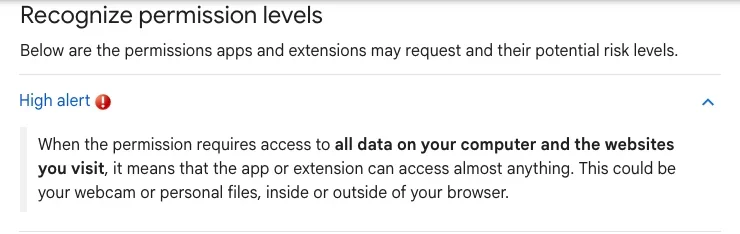
Chrome's developer docs list the warnings you see at install time, and two of them matter most here: “Read and change all your data on all websites” and “Read data you copy and paste.” Google spells out the first one as access to “read, request or modify data from every page you visit (bank account, Facebook).” Grant both, and the exchange page you have open and the wallet address you just copied are within its reach. This entry follows two routes: an extension that has nothing to do with wallets quietly swapping the address you copy, and a genuine wallet extension pushed a malicious update.

Why would a notes extension need your clipboard? Silent Swap, which McAfee disclosed in June 2026, ran on a fake “Google Notes” extension that asked for access to the clipboard, all URLs and your browsing history, according to The Hacker News (June 30, 2026). What it did with that access was simple. You copy a wallet address; it puts a different one in its place.
Some neighbouring entries, so you land in the right one. A counterfeit wallet extension that wants your seed phrase is covered in fake wallets and seed-phrase traps. A look-alike address copied out of your own transaction history is address poisoning. Someone talking you into installing remote-control software is a remote access scam. This page deals only with an extension already sitting in your browser with permissions it should not have.
Before you install: what each warning lets it do
Chrome shows a fixed set of permission warnings, and the developer documentation lists the exact wording next to each permission. These are the ones worth slowing down for if you keep crypto in the same browser (checked 2026-10-21):
- “Read and change all your data on all websites.” (Listed for permissions such as proxy and debugger.) Google describes access to every-site data as being able to “read, request or modify data from every page you visit (bank account, Facebook).” An exchange’s web app counts as a page you visit.
- “Read data you copy and paste.” (Permission name: clipboardRead.) Google’s wording: “The app or extension can access information you’ve copied and pasted.” Almost nobody types a wallet address by hand.
- “Modify data you copy and paste.” (Permission name: clipboardWrite.) This is the half that lets something change what lands in your paste.
- “Manage your apps, extensions, and themes.” (Permission name: management.) Your wallet extension is one of those extensions.
- “Read your browsing history.” (Listed for the tabs permission.)
Updates are the other moment to watch. Chrome’s developer docs say that when a new version adds a permission that triggers a warning, “the extension will be disabled until the user accepts the new permission.” So if a translation helper you have used for months suddenly switches itself off and asks for something new, read the request before clicking through.
Our own preference: keep the browser that holds your wallet extension as bare as possible, and use the web version of price trackers, translators and screenshot tools rather than installing them. That is our call, not Google’s. Google’s help page says “Make sure you only approve extensions that you trust,” and adds that if you turn on Enhanced protection in Chrome, it warns you when an extension you want to install isn’t trusted.
Two cases: what they asked for, how they got in
One never touched the Web Store. The other came through the store’s normal update channel.
Silent Swap (disclosed by McAfee, June 2026). According to The Hacker News, it “injects the extension by modifying the Secure Preferences and Preferences” files, so the extension can “bypass the normal extension web store installation process and load silently without user approval.” There is a catch, which the report also notes: on newer browser versions, the trick depends on developer mode being turned on. The extension it loads is the fake “Google Notes,” asking for the clipboard, all URLs and browsing history.
It is “capable of intercepting and manipulating wallet addresses copied into the system clipboard,” and the report lists Bitcoin (BTC), Ethereum, Bitcoin Cash, Ripple and Dash. One detail makes it harder to defend against: “Each submitted address is mapped to a unique attacker-controlled address.” A blocklist of known scam addresses will not catch much here.
When you audit your browser, then, don’t stop at “did I install anything odd from the store?” An extension can show up that you never installed and never approved.
Trust Wallet browser extension, version 2.68 (December 2025). This time the extension was the real one. The Hacker News reported on December 26 that, per Trust Wallet, “the hacker used a leaked Chrome Web Store API key to submit the malicious extension version v2.68,” bypassing the company’s standard release checks. Only version 2.68 was affected: “Mobile-only users and all other browser extension versions are not affected.” According to the same report, Trust Wallet said it had confirmed that approximately $7 million was impacted and that all affected users would be refunded, and advised users to update to version 2.69 as soon as possible.
Where the seed phrases went comes from blockchain security firm SlowMist, quoted in the same report: once decrypted, the mnemonic phrase was sent to an attacker-controlled server. That part is third-party analysis cited by the report, and we are not linking the server’s domain.
Permission wording comes from Chrome’s developer documentation (permissions list and permission warnings); site access options, removal steps and the Enhanced protection note come from the English Chrome Web Store help pages; the seed-phrase rules come from MetaMask’s help centre; the two cases come from The Hacker News, December 26, 2025 and June 30, 2026. Checked 2026-10-21.
We did not install any of the malicious versions named here. Everything above is checked against Google’s documentation and vendor statements. Where Google’s pages do not give exact on-screen wording, such as where the developer mode switch sits, we do not invent it.
Already installed: check site access, then remove
Open Chrome’s extensions management page from the browser menu (Google’s help page linked below walks through the path) and go down the list with three questions.
- Do you recognise every one? If you can’t remember installing it or what it is for, remove it first and ask questions later. The Silent Swap extension went by “Google Notes,” a name that looks like it belongs there.
- Is site access wider than it needs to be? Google says you can “change the extension’s site access to On select, On specific sites, or On all sites.” On all sites means: “Allow the extension to automatically read and change data on all sites.” Anything that doesn’t need to run on every page by itself can go down to On select. These settings are about site data; if an extension holds clipboard access it has no use for, move straight to the next step.
- Remove it. The quickest route Google gives: “Right-select the icon and select Remove from Chrome.”
While you are there, look at developer mode. Silent Swap needs it switched on in newer browsers. If you have never turned it on and it is on, something has probably been changing this computer’s browser settings, and cleaning up extensions alone won’t be enough.
Think you were hit? Work through this in order
- Stop copying addresses on this computer to send funds. If the clipboard is being swapped, what you paste is not what you copied. If a transfer truly can’t wait, check the whole pasted address against the source, character by character, from the first to the last.
- Remove anything suspicious; set the rest to On select. Steps are in the section above.
- Work out whether your seed phrase could have leaked. MetaMask says the legitimate times to enter it are first setup, restoring a wallet and resetting a password; “No legitimate MetaMask website will ever ask for your Secret Recovery Phrase”; and “MetaMask will never pop up without you initiating a transaction.” Its advice: “if you suspect that someone has your Secret Recovery Phrase, you should migrate to a new one.” A wallet whose seed phrase is out can be emptied completely, so don’t leave this for later. These are MetaMask’s statements about MetaMask; for any other wallet, check its own help pages.
- If you ran Trust Wallet’s extension version 2.68. Trust Wallet’s advice was to update to 2.69 as soon as possible. Given SlowMist’s finding that seed phrases were sent out, and MetaMask’s rule of moving to a new wallet when you suspect a leak, we would update and also move the funds to a new wallet. That is our reasoning, not a Trust Wallet statement.
- Check token approvals separately. Extensions like these go after addresses and seed phrases. If you also signed approvals on a dodgy site, that is a different problem; work through the approval checkup and revoke them one by one.
- Funds already gone. Write down the transaction hash, the extension’s name and roughly when it was installed, then follow the first 4 things to do after a scam.
Frequently asked questions
If I installed it from the Chrome Web Store, am I safe?
Not on that basis alone. Trust Wallet’s extension version 2.68 reached users through the store: according to Trust Wallet as quoted by The Hacker News, the attacker used a leaked Chrome Web Store API key to submit the malicious version, bypassing the company’s standard release checks. Google puts it in one line: “Make sure you only approve extensions that you trust.”
My wallet extension popped up asking me to re-enter my seed phrase after an update. Should I?
For MetaMask, no. Its help centre says it does not need you to routinely enter your Secret Recovery Phrase, that the legitimate moments are first setup, restoring a wallet and resetting a password, and that MetaMask will never pop up without you initiating a transaction. If you use a different wallet, check that wallet’s own help pages.
- Chrome Web Store Help: install and manage extensions (site access options, Remove from Chrome, Enhanced protection)
- Chrome Web Store Help: permissions requested by apps and extensions (every-site data, copy and paste)
- Chrome for Developers: permissions list (install-time warning wording)
- Chrome for Developers: permission warnings (extension disabled until a new permission is accepted)
- MetaMask Help Center: how do I recognize the real MetaMask (when a seed phrase is needed, migrating after a suspected leak)
- The Hacker News, December 26, 2025 (Trust Wallet extension 2.68, leaked Web Store API key, about $7 million, SlowMist analysis)
- The Hacker News, June 30, 2026 (Silent Swap disclosed by McAfee, Preferences file injection, clipboard address swapping)